
If you are buying or transferring ownership of an ex-diplomat vehicle, the process requires strict compliance with both the Ministry of Foreign Affairs and the National Transport and Safety Authority (NTSA). Below is a step-by-step breakdown of the requirements and the full application procedure.
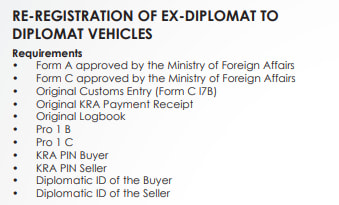
📋 PART 1: Required Documents
Before beginning the online application, ensure you have the following documents ready:
✅ Approved Ministry of Foreign Affairs Forms:
Form A – Approved by the Ministry of Foreign Affairs
Form C – Approved by the Ministry of Foreign Affairs
✅ Customs & KRA Documents:
Original Customs Entry (Form C17B)
Original KRA Payment Receipt
✅ Vehicle Ownership Documents:
Original Logbook
Pro 1 B
Pro 1 C
✅ KRA PIN Details:
KRA PIN – Buyer
KRA PIN – Seller
✅ Diplomatic Identification:
Diplomatic ID of the Buyer
Diplomatic ID of the Seller
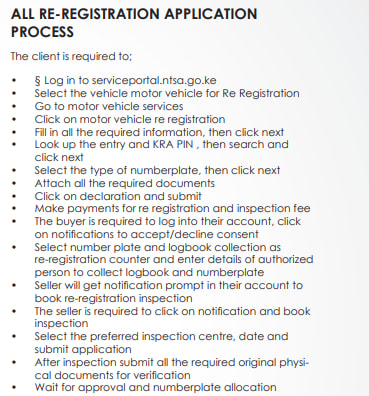
💻 PART 2: Online Application Process (NTSA Portal)
Follow these steps carefully to complete the re-registration application:
🔹 Step 1: Log In
Visit: serviceportal.ntsa.go.ke
Log into your registered NTSA account.
🔹 Step 2: Select Vehicle
Navigate to Motor Vehicle Services.
Click on Motor Vehicle Re-Registration.
🔹 Step 3: Fill in Details
Enter all required vehicle information.
Click Next.
🔹 Step 4: Customs & PIN Lookup
Look up the Customs Entry and KRA PIN.
Search and verify details, then click Next.
🔹 Step 5: Select Number Plate Type
Choose the preferred type of number plate.
Click Next.
🔹 Step 6: Upload Documents
Attach all the required documents as listed in Part 1.
Ensure all uploads are clear and legible.
🔹 Step 7: Declaration & Submission
Read the declaration statement.
Click on Declaration and Submit.
🔹 Step 8: Make Payments
Pay the re-registration fee.
Pay the inspection fee.
Keep the payment receipt for reference.
🔄 PART 3: Buyer & Seller Actions
👤 Buyer:
Log into your NTSA account.
Go to Notifications.
Accept/Decline Consent for the transfer.
👥 Both Parties:
Select Number Plate & Logbook Collection Point:
Choose Re-Registration Counter as your collection point.
Enter details of the authorized person who will collect the logbook and number plates.
🔍 PART 4: Vehicle Inspection
📅 Seller Action:
You will receive a notification prompt in your NTSA account.
Click on the notification and book inspection.
Select:
✅ Preferred Inspection Centre
✅ Preferred Date
Submit the booking application.
📋 Physical Verification:
After successful inspection, submit all original physical documents for verification at the designated NTSA office.
✅ PART 5: Final Approval
Wait for NTSA approval and number plate allocation.
Once approved, collect your new logbook and number plates from the selected re-registration counter.
🚗 Need transport to NTSA offices, inspection centres, or document collection points?
Afrivibe Rentals provides reliable, comfortable cab services and car hire across Kisumu, Nairobi, and Western Kenya. Whether you’re completing official transactions or running errands, we ensure you arrive on time and stress-free.
👉 Book Your Ride via WhatsApp
📞 Call/SMS: 0710899460
🌐 www.kisumuairportcabs.co.ke
Stay compliant. Stay mobile.